"AI for law firms" usually means a chat window where someone pastes text and hopes for the best. The more useful version is AI built into the firm's own software, connected to the matter, the documents and the firm's checklist, doing one specific job at a time. Here's how the Claude document review in the Florida family law platform is put together, and what that means for building it into your system.
The job it does
In a family law matter, both sides exchange a long list of financial documents: tax returns, pay stubs, bank and retirement statements, credit card statements and more. Someone at the firm has to open every file, figure out what it is, check whether it covers the requested period, note the key figures and spot anything odd. It's careful, slow work, and it's exactly the kind of reading Claude is good at.
Step 1: reading each document
When a client uploads a file through the portal, or staff add the other side's documents, the system sends it to Anthropic's Claude API with instructions that describe what to record. For each document, Claude returns structured data, not a paragraph:
- What the document is, such as "Chase joint checking statement"
- The period it covers
- Key figures, each with the page number it came from
- Anything unusual, such as a large transfer or an account that isn't listed elsewhere in the file
- Anything missing, such as a skipped month or missing pages
Because the result is structured, the software can store it, show it in tables and use it in later steps. PDFs are uploaded to the API once and reused, so asking follow-up questions doesn't mean sending the same file again.
Step 2: matching files to the checklist
Clients rarely name files helpfully. "Scan_0034.pdf" could be anything. Files uploaded against a specific to-do item are tagged with it automatically. For everything else, Claude reads the document and proposes which checklist item it belongs to. The firm's tracker then shows the item as received, with the file attached, and staff can correct the match if needed.
Step 3: summarizing the production
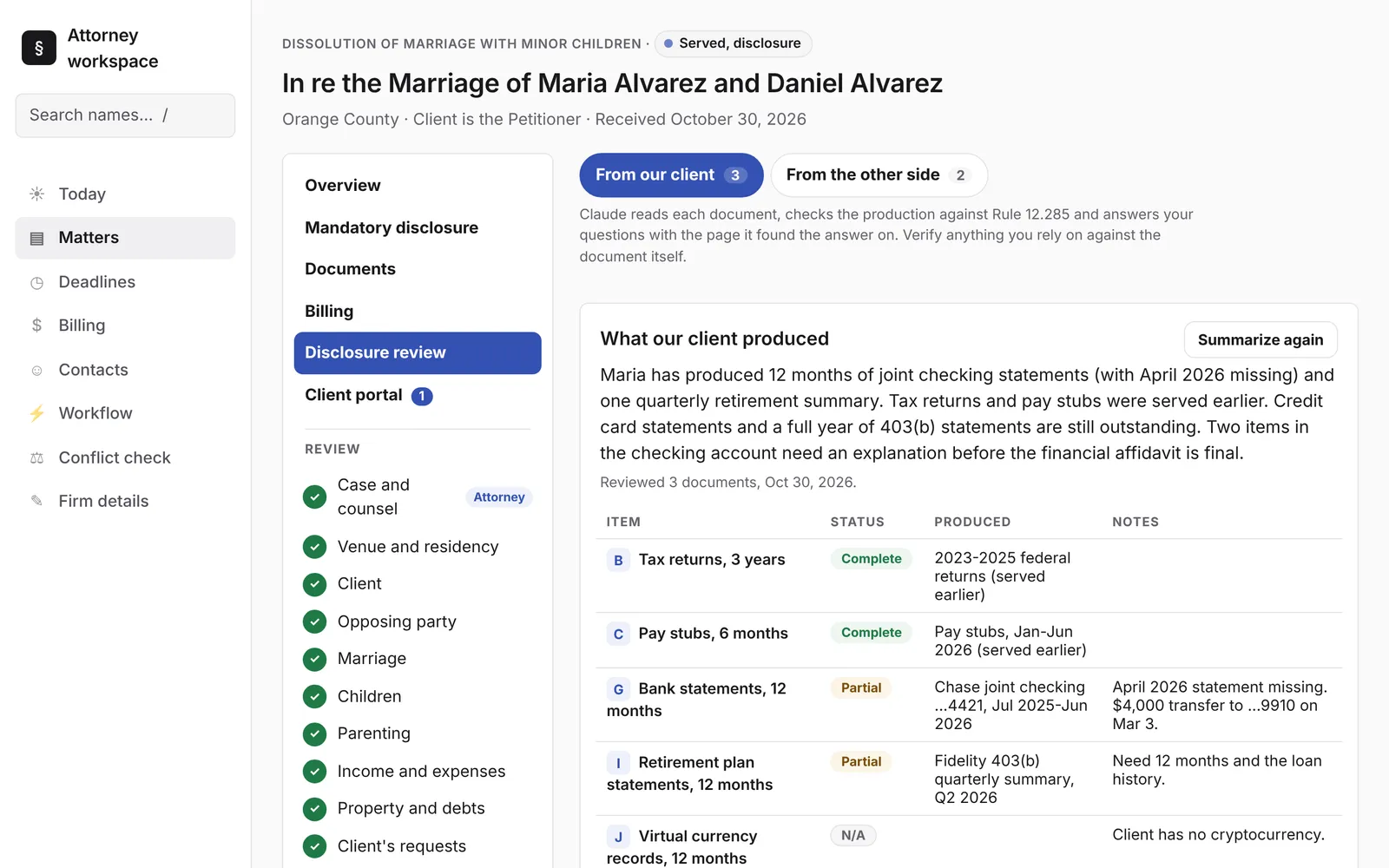
With every document read, the system asks Claude for a summary of the whole set against the firm's checklist. The result is a table: each item marked complete, partial, missing or not applicable, with notes. Above it is a short plain-English overview. In the example matter, it reported that twelve months of joint checking statements had been produced with April missing, that a $4,000 transfer to an unfamiliar account needed an explanation, and that credit card statements were still outstanding.
The summary ends with a list of what to request next. One click puts a request on the client's portal to-do list, in plain words.
Step 4: answering questions, with sources
Staff can ask questions in plain English: "Which accounts received transfers over $1,000?" or "What was the year-to-date gross on the June pay stub?" Each answer cites the file, the page and the quoted text it relied on. That's the difference between an answer you can use and one you have to redo: checking a citation takes seconds.
The guardrails that matter
- A person confirms everything. Claude reads, summarizes and drafts. It doesn't send, file or decide anything.
- Citations by default. Answers point to the page, and the screen reminds users to verify anything they rely on against the document itself.
- Opt-in data flow. Documents go to Anthropic's API only for the features that need them, and only when the firm turns those features on with its own API key. Which Claude model to use is a setting.
- Clear simulation labels. In demos, any AI output that's played back rather than live is labeled as simulated.
The same pattern, other jobs
Read, structure, match, summarize and cite is a pattern, not a single feature. The same building blocks handle intake triage, pulling data out of PDFs during a migration, matter status summaries and first drafts of routine correspondence from the firm's own templates. In the workflow builder, Claude also turns a plain-English request, like "two weeks before every hearing, e-mail the client a reminder", into a draft automation for a person to check and save.
Why build it in instead of using a chat tool
A general chat tool doesn't know your checklist, your matter, or where its answer should go. Built-in AI does: it reads the right files, writes its results into the right fields, and puts its suggestions in front of the right person at the right step. That's where the time savings actually come from.
Want to see it on fictional files? Book an intro call, or read more on the Claude AI for law firms page.